Internship CV Template, Internship Pathway
Early Career resume template · Header banner, single-column layout
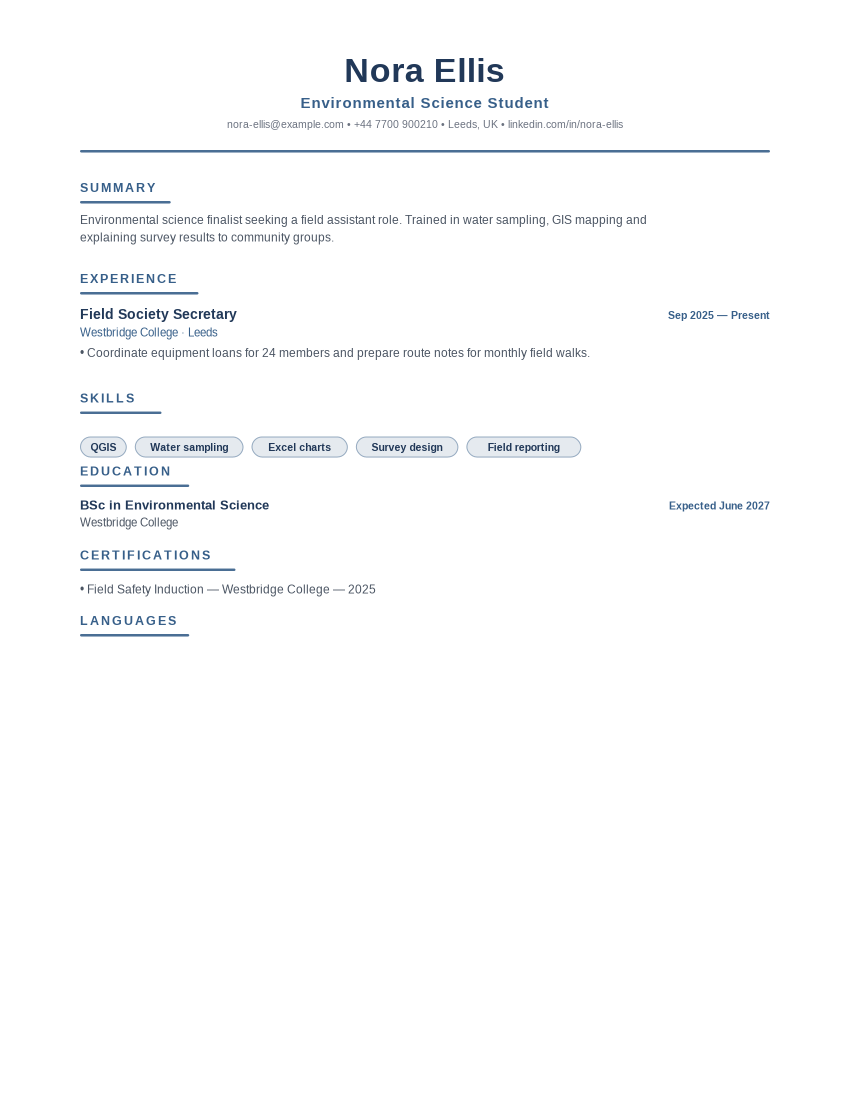
Internship Pathway opens with a short objective and a worked project example. Use the experience section for a placement, student society or volunteer role where you applied the same skills.
Designed for
- Internship Applicants
- Placement Students
- Entry-Level Candidates
Open it in the resume builder, replace the sample text, and export when you are ready. There is no watermark and no signup.
Key features of the Internship Pathway template
Full-width header block for name, role title, and contact links above a clean single-column body. Standard headings and selectable text help readers follow your experience. After exporting, check that your contact details, job titles and dates copy in the intended order; extraction can differ between systems.
Full-width navy header
Projects before experience
Single-column chronology
Compact core skills
Space for volunteering
Layout & formatting specifications
- Template name
- Internship Pathway
- Design style
- Modern
- Column structure
- Header banner, single-column
- Page dimensions
- A4 & US Letter
- Default color palette
- #13334a#11697a
- ATS text layer
- Selectable text, standard headings
- Download formats
- PDF, Word (DOCX), Plain Text (TXT)
Included resume sections
The Internship Pathway template comes pre-configured with the sections below. Inside the builder, you can rename headings, reorder blocks, or hide any section you do not need.
- Contact Header
- Professional Summary
- Work Experience
- Education
- Core Skills
- Certifications & Projects
Ready to customize in the builder
Click Use this template to open the Internship Pathway layout directly in the resume builder, enter your own experience and skills, and export a watermark-free PDF, DOCX, or TXT file.
Who the Internship Pathway template is for
Internship Pathway carries a full-width navy header and prints the career objective, then projects, then relevant experience, then skills, with education closing the page.
That order is a deliberate choice for placement and summer-internship applications: the reader meets evidence of working method before they meet the degree. The palette is darker than the collection's other layout, so the two documents are distinguishable at a glance in a folder of applications.
How to get the most from the Internship Pathway layout
- Choose it when you are applying to a placement, internship or industrial year rather than a graduate scheme or a first permanent post.
- Use the projects block for the piece of work closest to the advert, written with its scope, method and outcome in view.
- Record unpaid and part-time work under relevant experience with dates, and describe the responsibility the way you would describe a paid role.
- Keep the comma-separated skills block short enough to read on two lines, and make sure each skill is demonstrated in the project or role above it.
- Move education up in the builder for any application where your course is the decisive evidence; the layout supports both orders.
How to customise the Internship Pathway template
- 1
Open the layout and set the target in the objective
Select Use this template to open Internship Pathway with the filled business analytics example. Rewrite the objective around the internship you are applying for, and state your availability window if the advert names one.
- 2
Put your strongest project first
Choose the project closest to a task in the posting. Describe the problem, the tool or method, what you personally produced and the outcome, in the same shape as the demand-forecast example the preview shows.
- 3
Fill relevant experience with real, dated work
Add volunteer roles, society posts, part-time jobs and shadowing with organisation, dates and responsibilities. Label unpaid work accurately and keep the bullets focused on what you were accountable for.
- 4
Check the skills list, then check the export
Trim the skills to the tools you could be tested on. Export the requested file type, open it, and confirm the page breaks and reading order survive; the ATS scanner gives a second opinion on what a portal can extract.
Student template · Projects and experience first
What the Internship Pathway document contains
The template prints these headings in this order. Every one is editable in the builder, so you can rename Experience to something the vacancy uses, or move education up if your course is the stronger argument.
- Career objective
- Two or three lines saying which internship you want and what you can already do. The example states that the candidate is a business analytics student seeking a summer operations placement who uses spreadsheets and SQL to answer practical questions about stock, demand and staffing. If the placement has a fixed window, put the dates you are available here.
- Projects
- The leading section. The example describes a food pantry demand forecast: 16 weeks of anonymised collection logs cleaned in SQL, a four-week rolling forecast compared with actual demand, and a recommendation to hold a reserve for exam weeks. The scope, the method and the decision are all visible in three sentences.
- Relevant experience
- Any role where you did real work, dated and described. The example lists a volunteer shift lead who plans collection slots for six volunteers, reconciles deliveries against a stock register, and trialled a shelf checklist that cut missed expiry checks from five to one in a month. Unpaid work is labelled as volunteer work rather than presented as an internship.
- Skills
- A comma-separated block, which keeps a technical list on two lines without a graphic. The example names SQL joins, Excel pivot tables, demand forecasting, shift planning and stock reconciliation, and each one is demonstrated in the project or the role above it.
- Education
- Degree, field, institution and expected graduation date, placed after the evidence because this layout assumes a panel will read your projects first. That ordering is a design choice, not a claim that your course does not matter: the block is still present, dated and precise.
- Certifications and training
- Course certificates, software credentials and short training that support the tools you claim. The example carries a spreadsheet modelling lab from a business school. Name the awarding body and the year, and do not list a certificate you could not produce if asked.
How to write an internship CV with little or no experience
An internship application is read for potential and evidence of working method. The layout gives you the order; these four decisions give it the substance.
- 1
Lead with the project that best matches the advert
Pick the piece of work closest to a task named in the posting, and put it first. Describe the problem, the tool or method you chose, what you personally delivered and the outcome. One project explained properly is stronger than four titles with no detail.
- 2
Make your contribution visible in group work
Placement panels interview on the detail, so separate your part from the team's result: which module you wrote, which tests you ran, which section of the report you owned. Crediting the group while stating your own work is both honest and more persuasive.
- 3
Count unpaid and part-time work as experience
Volunteering, a society committee post, a retail shift, tutoring, a family business, a care responsibility sustained over months: all of it demonstrates reliability, and this template gives it a dated block. Label it accurately, then describe the responsibility in the same shape as a paid role.
- 4
Answer the practical questions a placement team asks
State your availability window, your year of study, whether the placement is part of your degree, and whether you can work in the location. Right-to-work or visa detail belongs in the objective or a short line under education when the advert raises it. Leaving these questions unanswered costs interviews.
Keep reading before you export
If you are applying for a first graduate role rather than a placement, and your degree and coursework are the main story, Campus Essential puts education at the top of the page instead.
The collection page compares the two student layouts and explains what a student resume should contain. The first-job samples show filled documents you can read alongside this one.
Similar resume templates
Swipe, pause or use the arrows to compare other modern layouts.
Frequently asked questions
Practical details about formatting, ATS compatibility, and customizing the Internship Pathway template.
Can I include volunteer shifts instead of an internship?
Yes. Give the organisation, dates and your duties, label the role as volunteer work, and show how it prepared you for the placement. Regular shifts sustained over months read better than a single event.
Where should I mention my availability?
If the placement specifies a start date or a summer window, put the dates you can work in the opening objective. This layout prints the objective first, so the answer is the first thing a placement team reads.
Why does education come last on this template?
Because a placement panel is reading for evidence that you have already done something close to the work. The education block is still present, dated and precise; move it up in the builder if your course is the stronger argument for a particular application.
Is the Internship Pathway template really ATS-friendly?
ATS products and employer configurations differ, so this template cannot guarantee parsing or screening results. Check the layout and exported text, use accurate role-specific content, and follow the employer's file instructions. Any compatibility percentage shown on this page is not an independent test by an ATS provider.
Can I download my resume as a PDF or Word file for free?
You can export a PDF, Microsoft Word (DOCX), or plain-text (TXT) file without a watermark. Review the downloaded file before sending it and follow the employer's requested file format. ATS products and employer settings differ, so no template or export can guarantee parsing in every system.
Is this resume template completely free?
The resume builder and PDF, DOCX, and TXT exports are available without payment or an account. Online AI or analysis tools may depend on service availability; see the Privacy Policy for details about how submitted information is processed.
Do I need to create an account to use this template?
No account is required to use the builder. Drafts are stored in your browser; some online features send submitted information to configured services for processing. See the Privacy Policy for details.
Related ResumeEarth tools and guides
Explore role-specific resume collections, ATS checking tools, and formatting guides to complete your application.
ATS Resume Scanner
Test your exported PDF or Word resume for parsing accuracy, section detection, and keyword coverage.
Job Description Keyword Matcher
Compare your resume against a specific vacancy to spot missing hard skills and role terminology.
AI Cover Letter Generator
Create a tailored cover letter that complements your Internship Pathway resume.
How to Make an ATS-Friendly Resume
Practical formatting rules for headings, dates, columns, and file exports that parse cleanly.
Create your resume with Internship Pathway
Open the template, add your details, and export a watermark-free PDF, Word (DOCX), or TXT file when it reads the way you want.
No credit card. No signup. Free to use.